
Detailed workflow guide
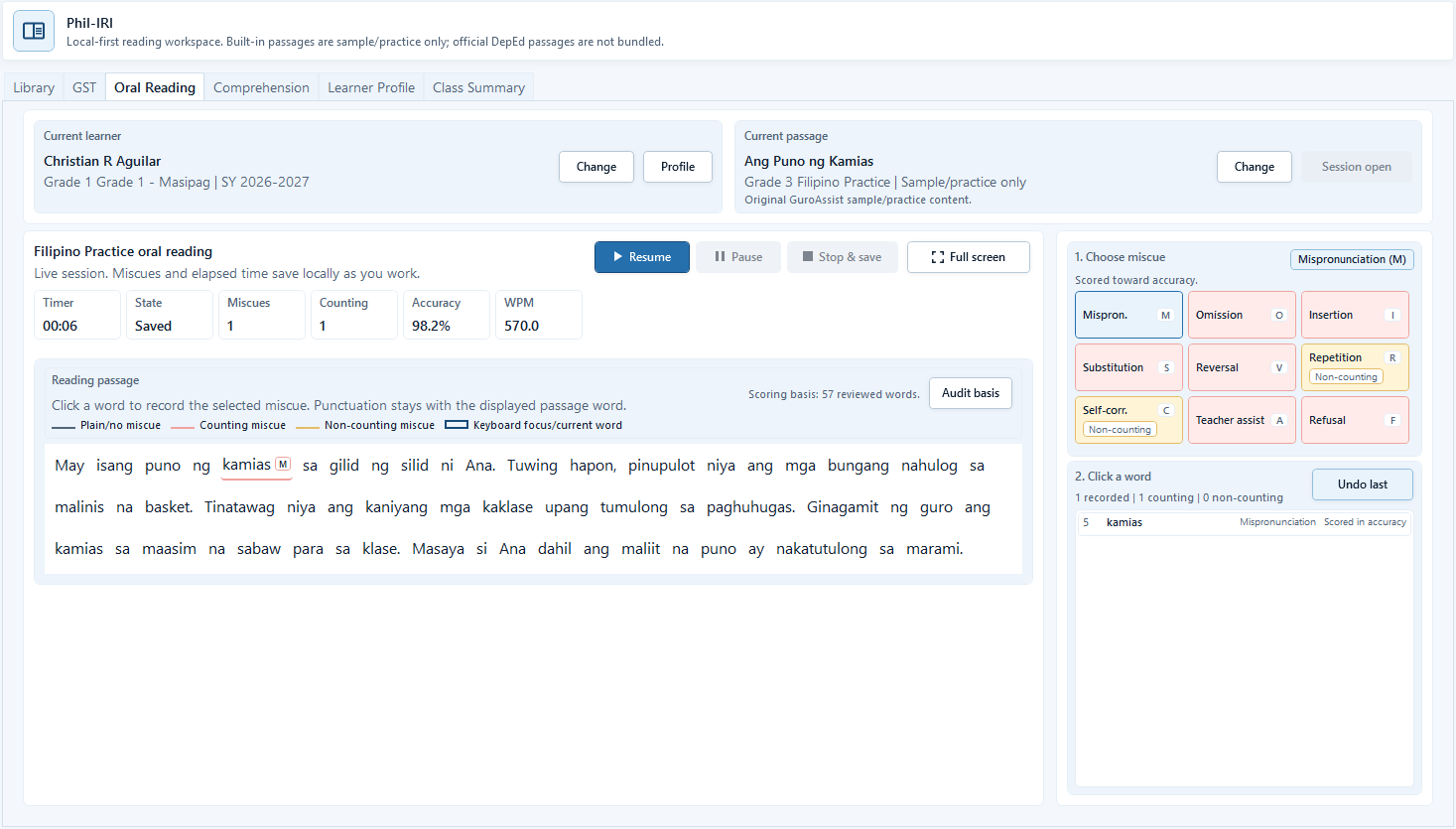
Run an oral reading session
Oral reading sessions help teachers choose a learner and passage, start or resume a session, mark miscues and answers, and review local reading notes.
Teacher goal
How do I record oral reading miscues and notes without exposing learner data?
Use this guide when this is the task in front of you. Stop if the selected class, learner, role, school year, file, or output does not match.
In-app path
- Phil-IRI Toolkit
- Oral Reading
Get ready
Check the starting point
These are the minimum conditions for the workflow to make sense.
Before you start
Estimated time: About 5–10 minutes
- The intended local learner and passage
- Teacher-observed miscues, score, and notes
- A teacher review of the local interpretation before follow-up
You should see
Oral Reading shows the intended learner, passage, miscues, score, and saved local interpretation for teacher follow-up.
Steps
Complete the task in order
Review choice points, save or preview behavior, and any stop condition before continuing.
 View full size
Captured July 11, 2026. Step 1
Choose the learner and passage
Select the learner, passage, phase, and reading setup before starting the session.
- 2
Step 2
Start or resume the timer
Use the session controls to start, pause, resume, or continue the reading session as the learner reads.
- 3
Step 3
Mark miscues and answers carefully
Record counting and non-counting miscues, answers, and teacher observations only as needed for reading support.
- 4
Step 4
Review the local session notes
After the session, review miscues, comprehension notes, and any follow-up ideas before saving or exporting anything.
- 5
Step 5
Back up reading records
Use Settings backup before changing laptops, cleaning old reading records, or moving local work to another device.

Review
Check these before relying on the work
These checks cover saved, previewed, generated, and teacher-review states.
Learner and passage match
The selected learner and passage should match the actual reading session.
Timer and notes are reviewed
Confirm the recorded session details before saving the record.
Privacy is protected
Keep reading notes local and avoid unnecessary sensitive details in exports or shared files.
Follow-up is teacher-owned
Use notes to plan support without making automatic decisions about the learner.
Blocked states and recovery
Fix the blocker before continuing
Use the direct recovery action when GuroAssist is waiting for setup, data, access, policy, or file readiness.
No learner selected
Choose the learner before starting or saving a learner-specific oral reading session.
After recovery: The intended learner is selected and the learner-dependent action is available.
Review roster helpNo passage selected
Select an available passage or import a teacher-provided one first.
After recovery: The blocker is no longer shown, and the intended next action is available for teacher review.
Troubleshoot this blockerSession details are incomplete
Review timer, miscues, answers, and notes before saving.
After recovery: No unresolved scan or manual-check item remains, and the reviewed result is ready to save.
Troubleshoot this blockerRecords need backup
Back up local reading records before device changes or major cleanup.
After recovery: The backup or restore summary shows the intended local workspace and a clear success or recovery state.
Open backup and restore help
Safety note
Oral reading records contain sensitive learner reading notes. Keep them local, review them carefully, and share only through the teacher's intended process.
Finish
Verify the result
Do not treat a saved screen or generated filename as proof that the work is ready.
You’re done when
Oral Reading shows the intended learner, passage, miscues, score, and saved local interpretation for teacher follow-up.
Glossary
Expand the terms used in this guide
Use the plain-language meaning here, then follow the exact label in GuroAssist.
- Phil-IRI
- Philippine Informal Reading Inventory; GuroAssist keeps reading work local and review-based.
- GST
- Group Screening Test used to identify the next local reading step.
Guide details
Guide verification
Use these details to confirm that this guide matches the GuroAssist version and school year you are using.
- Verification
- Verified with GuroAssist 1.0.0.0
- Last reviewed
- July 11, 2026
- Screenshots
- Captured July 11, 2026
- Applies to
- 2026–2027
Was this helpful?
Choose an answer or report a guide that needs attention. No class, learner, or free-text data is sent by these buttons.
Related guides