
Detailed workflow guide
Prepare Test Builder alternate forms and local packets
Preview & Export distinguishes fully equivalent item-family forms from shuffled alternate forms, then lets the teacher export the exact administration, review, or evidence packet needed.
Teacher goal
How do I create multiple versions and packet files without overstating that every form is equivalent?
Use this guide when this is the task in front of you. Stop if the selected class, learner, role, school year, file, or output does not match.
In-app path
- Test Builder
- Preview & Export
- Alternate forms or Local packets
Get ready
Check the starting point
These are the minimum conditions for the workflow to make sense.
Before you start
Estimated time: About 10–20 minutes
- A ready base test with its item order
- Teacher-reviewed version and manual-check settings
- Time to open each local packet or answer key before use
You should see
Preview & Export shows honest equivalent-or-shuffled form status and the intended local administration, review, or evidence packet files.
Steps
Complete the task in order
Review choice points, save or preview behavior, and any stop condition before continuing.
- 1
Step 1
Choose the version count in Build Test
Set the intended number of versions before generating. Review item order, question-type groups, total points, purpose, and component for the base test.
- 2
Step 2
Read Alternate forms readiness
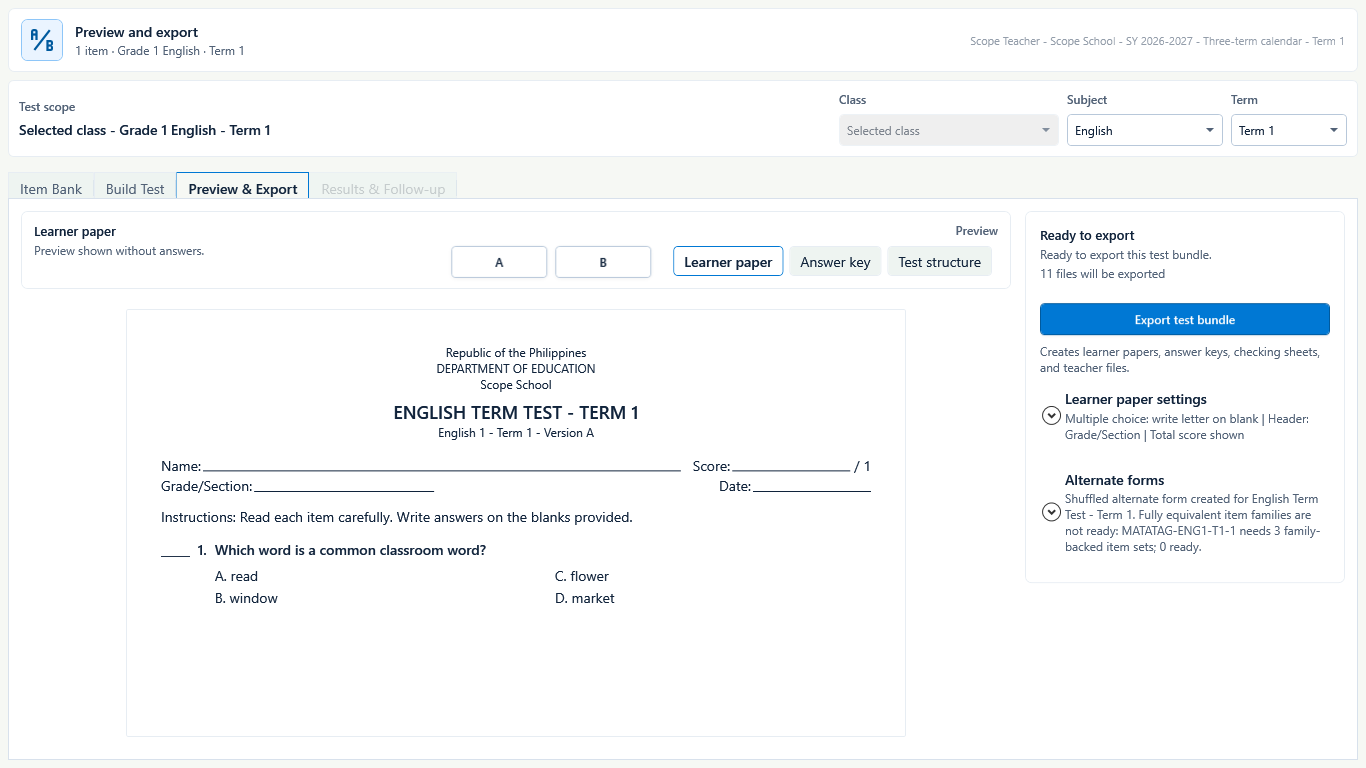
In Preview & Export, expand Alternate forms. GuroAssist checks whether each required competency has enough ready family-backed item sets for fully equivalent forms.
- 3
Step 3
Resolve readiness warnings or accept a shuffled form
For fully equivalent forms, fix every family-readiness warning and regenerate. If readiness is incomplete, use the clearly labeled shuffled alternate form and do not claim equivalent item difficulty.
 View full size
The readiness message names the output honestly: shuffled when full equivalence is not supported. Captured July 10, 2026. Step 4
Compare every version
Switch among A, B, and other generated versions. Review learner paper, answer key, and test structure so intended item coverage, numbering, answer mapping, directions, and point totals stay aligned. Confirm written or other manual-check items remain teacher-checked in every version.
- 5
Step 5
Export the test bundle
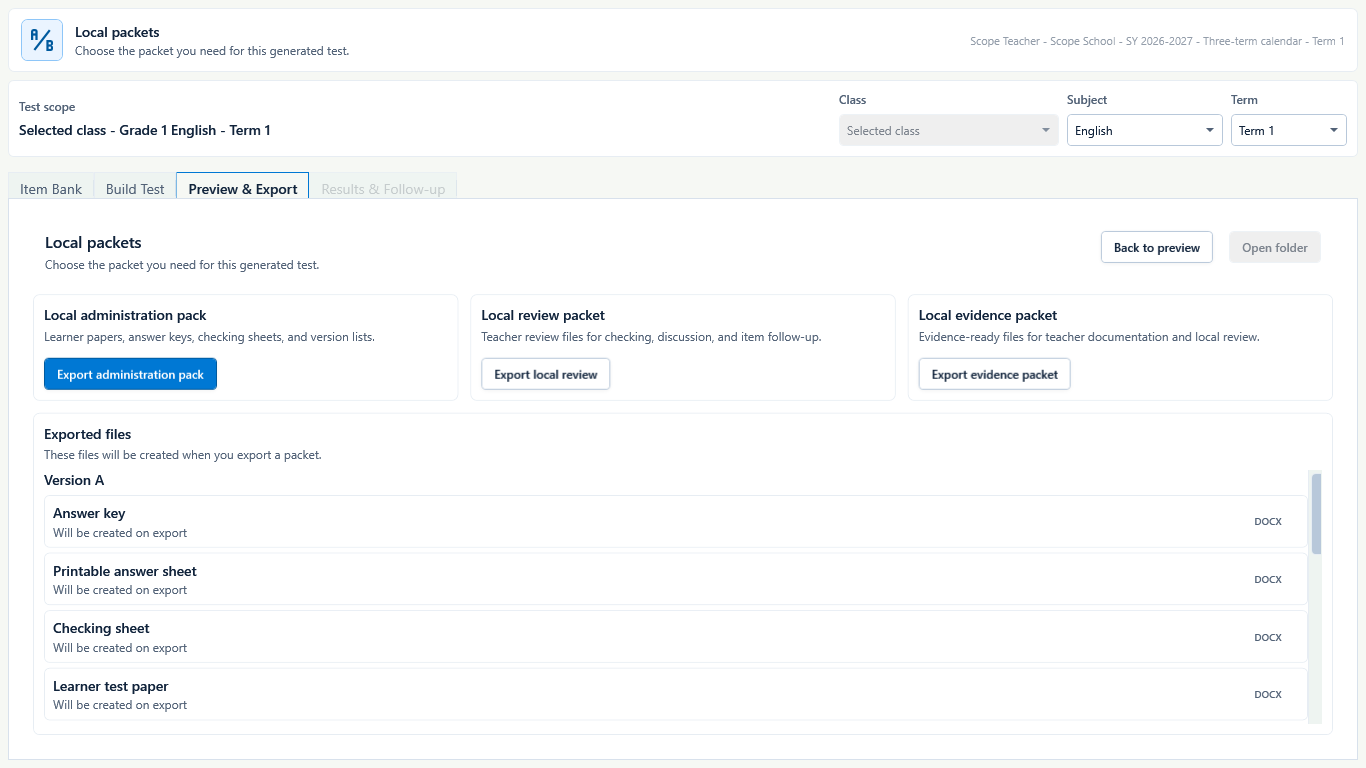
Choose Export test bundle for the generated DOCX set, which can include learner papers, answer keys, printable answer sheets, checking sheets, a version distribution list, and teacher reference files.
 View full size
Captured July 10, 2026. Step 6
Choose the smallest useful local packet
Use Local administration pack for classroom administration files, Local review packet for checking and discussion files, or Local evidence packet for teacher documentation and local review.
- 7
Step 7
Open and inspect the exported DOCX files
Check the version label, learner directions, page breaks, answer key, answer sheet, checking sheet, and distribution list. Keep each answer key paired with its version.
- 8
Step 8
Reopen or re-export from Generated tests
Return to Generated tests when you need to continue the same version, open the output folder, or export the bundle or local packet again after a correction. Confirm that the newly opened files match the current generated test before classroom use.


Review
Check these before relying on the work
These checks cover saved, previewed, generated, and teacher-review states.
Version claim is accurate
Fully equivalent is used only when item-family readiness passes without warnings; otherwise the form is called shuffled.
Version files stay paired
Learner paper, answer key, answer sheet, and checking sheet identify the same version.
No answer leakage
Administration files given to learners do not contain teacher-only keys or checking content.
Packet purpose fits
The teacher exports only the administration, review, or evidence files actually needed.
Actual DOCX files are reviewed
Every version and packet file is opened before printing, sharing, or classroom use.
Blocked states and recovery
Fix the blocker before continuing
Use the direct recovery action when GuroAssist is waiting for setup, data, access, policy, or file readiness.
Base test is not ready
Complete the scope, active items, structure, and generated test before alternate-form and packet work.
After recovery: The blocker is no longer shown, and the intended next action is available for teacher review.
Troubleshoot this blockerEquivalent families are incomplete
Resolve every item-family warning or use the shuffled-form path with honest labeling.
After recovery: The blocker is no longer shown, and the intended next action is available for teacher review.
Troubleshoot this blockerPaid is not active
Generated test bundles and local packet files require Paid where supported.
After recovery: Paid access and any required credits are shown as available for this action.
Open activation helpExported files were not inspected
Do not distribute a packet based only on the on-screen preview.
After recovery: The blocker is no longer shown, and the intended next action is available for teacher review.
Review generated-file help
Safety note
Multiple versions reduce simple answer sharing only when administered carefully. GuroAssist does not guarantee equal difficulty unless its fully equivalent item-family readiness check passes.
Finish
Verify the result
Do not treat a saved screen or generated filename as proof that the work is ready.
You’re done when
Preview & Export shows honest equivalent-or-shuffled form status and the intended local administration, review, or evidence packet files.
Guide details
Guide verification
Use these details to confirm that this guide matches the GuroAssist version and school year you are using.
- Verification
- Verified with GuroAssist 1.0.0.0
- Last reviewed
- July 11, 2026
- Screenshots
- Captured July 10, 2026
- Applies to
- 2026–2027
Was this helpful?
Choose an answer or report a guide that needs attention. No class, learner, or free-text data is sent by these buttons.
Related guides
Continue only where it helps
Use Test Builder Guided Build
How do I build a test while preserving my question-type order and answer safety?
Import and review Test Builder answer sheets
How do I import scanned answer sheets without turning uncertain marks into saved answers?
Review generated test history
How do I reopen previous generated tests and exported bundles safely?