
Detailed workflow guide
Prepare CPD renewal
CPD Renewal is local preparation for reviewing units, missing evidence, reminders, notes, and possible next steps before the teacher checks official PRC/CPDAS requirements.
Teacher goal
How do I use CPD Tracker for renewal planning without assuming success?
Use this guide when this is the task in front of you. Stop if the selected class, learner, role, school year, file, or output does not match.
In-app path
- CPD Tracker
- Renewal
Get ready
Check the starting point
These are the minimum conditions for the workflow to make sense.
Before you start
Estimated time: About 5–10 minutes
- Saved local training and evidence records
- The renewal period the teacher is planning for
- A separate check of current PRC or CPDAS requirements
You should see
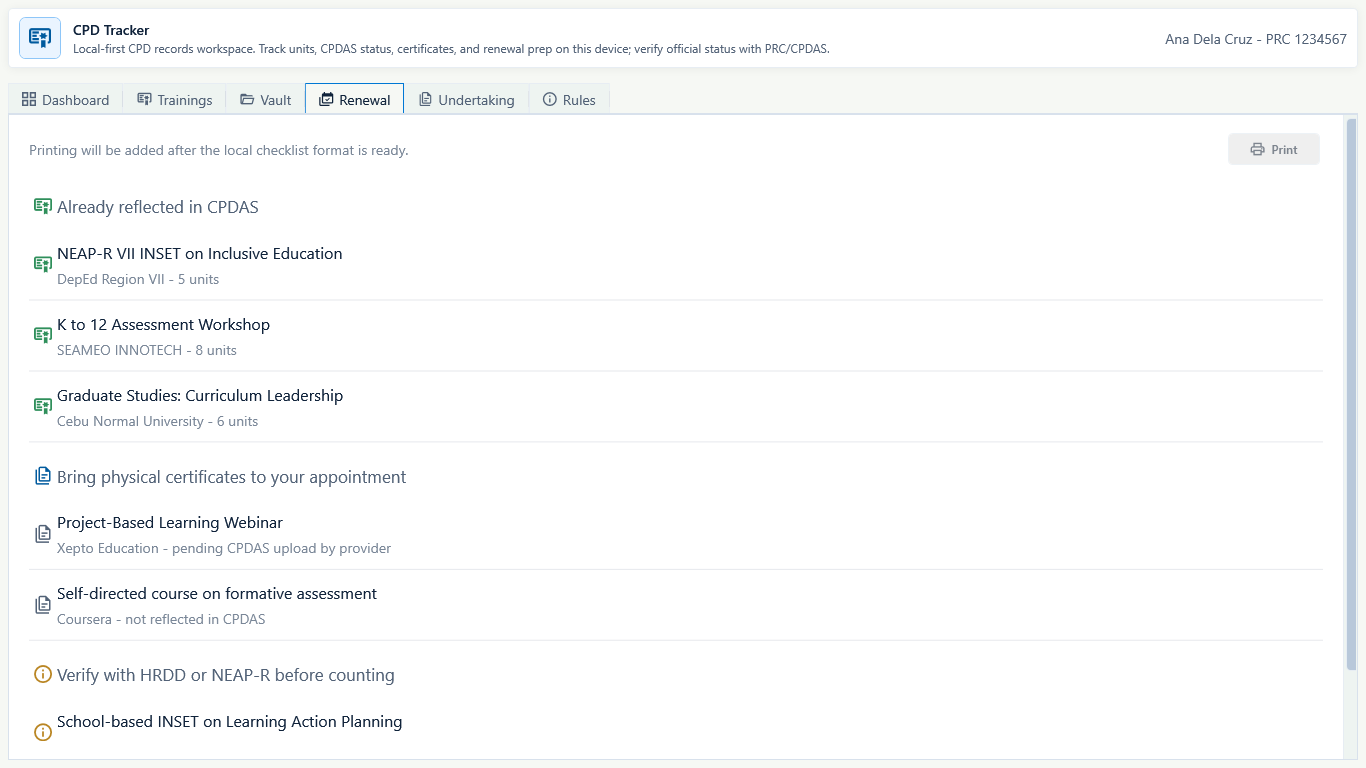
Renewal shows the teacher's locally recorded preparation status and a reminder to verify current official requirements.
Steps
Complete the task in order
Review choice points, save or preview behavior, and any stop condition before continuing.
 View full size
Captured July 11, 2026. Step 1
Review the dashboard signals
Check license details, PIC expiration, recorded units, missing evidence, and renewal reminders shown by CPD Tracker.
- 2
Step 2
Open missing evidence items
Review trainings or Vault entries that need certificates, clearer dates, CPDAS status, or local file references.
- 3
Step 3
Add teacher notes
Use local notes to record what the teacher still needs to check, attach, or verify outside GuroAssist.
- 4
Step 4
Prepare only local planning files
If the app offers generated renewal prep files, treat them as local drafts and open the actual files before using them.
- 5
Step 5
Check official status separately
Before renewal, verify the teacher's official status and current requirements with PRC/CPDAS or the appropriate official source.

Review
Check these before relying on the work
These checks cover saved, previewed, generated, and teacher-review states.
License dates are current
Account or CPD details should include the teacher's current license and expiration details where needed.
Units match evidence
Recorded units should match certificates or source documents the teacher can open.
Missing evidence is visible
Renewal prep should make missing files and uncertain status easy to see.
Drafts are reviewed
Any generated renewal prep file should be opened and checked before use.
Blocked states and recovery
Fix the blocker before continuing
Use the direct recovery action when GuroAssist is waiting for setup, data, access, policy, or file readiness.
License details are missing
Complete teacher license and expiration details before relying on renewal gap calculations.
After recovery: Paid access and any required credits are shown as available for this action.
Troubleshoot this blockerTraining evidence is incomplete
Add or correct certificates, units, dates, or local file references first.
After recovery: The blocker is no longer shown, and the intended next action is available for teacher review.
Review generated-file helpRules may have changed
Check CPD Rules and official sources when renewal requirements may have changed.
After recovery: The blocker is no longer shown, and the intended next action is available for teacher review.
Troubleshoot this blockerDraft file was not opened
Do not use generated renewal prep files until the teacher reviews the actual file.
After recovery: The blocker is no longer shown, and the intended next action is available for teacher review.
Review generated-file help
Safety note
CPD Renewal is local preparation. It helps the teacher review evidence and next steps, but it does not promise PRC acceptance or renewal success.
Finish
Verify the result
Do not treat a saved screen or generated filename as proof that the work is ready.
You’re done when
Renewal shows the teacher's locally recorded preparation status and a reminder to verify current official requirements.
Glossary
Expand the terms used in this guide
Use the plain-language meaning here, then follow the exact label in GuroAssist.
- CPD
- Continuing Professional Development; keep these records separate from class and learner data.
Guide details
Guide verification
Use these details to confirm that this guide matches the GuroAssist version and school year you are using.
- Verification
- Verified with GuroAssist 1.0.0.0
- Last reviewed
- July 11, 2026
- Screenshots
- Captured July 11, 2026
- Applies to
- 2026–2027
Was this helpful?
Choose an answer or report a guide that needs attention. No class, learner, or free-text data is sent by these buttons.